
K-cast operation manual
Create an account
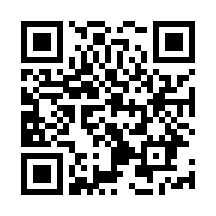
1. Open registration page
Open registration page "https://k-cast-hd.azurewebsites.net/register"
link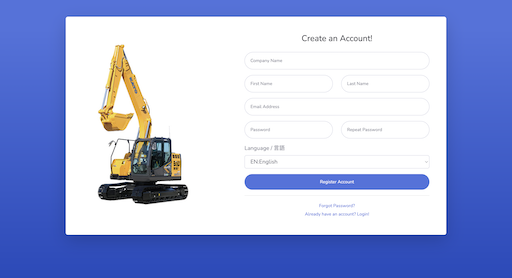
2. Register data from the user registration page
Input user information and press "Register Account" button, and system send you a confirmation email
- Company Name
- First Name
- Last Name
- Email Address
- The password must be at least 8 characters long and must contain both letters and numbers.
- English and Japanese is supported
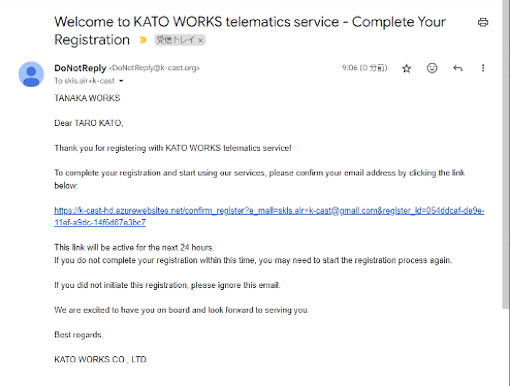
3. Access the full registration page via email
You will receive a confirmation email from the address DoNotReply@k-cast.org. Confirm the email and click on the URL to go to the registration page. If you do not receive it within 10 minutes, please register again.
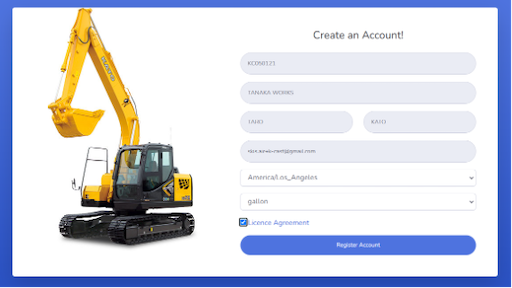
4. Set language and units, then check the license agreement
Select your timezone and capacity unit(litter or gallon) and check the "License Agreement".
- Once you have logged in, you can change your settings by clicking on "Settings" in the upper right-hand corner of the account view.