
K-cast operation manual
User manual
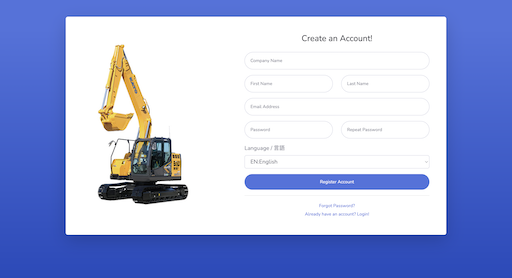
1. Create an account
This section explains how to register as a user.
- Register data from the user registration page
- Access the full registration page via email
- Set language and units, then check the license agreement
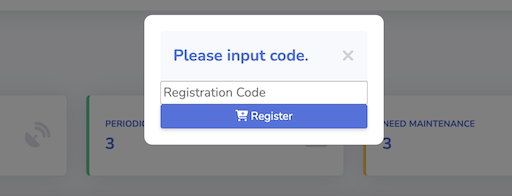
2. Device registration (Excavator)
Prepare the 8-digit Registration Code provided by the dealer, and this section explains how to register your device to list.
- Press the Register button in the device list
- Enter the assigned registration code
- Confirm it appears in the list
3. Device registration (Crane)
Log in to this site on your smartphone and select Machine Register from the menu.
- Adjust the nameplate to fit within the frame, then press the shutter button.
- Confirm that the serial number is visible in the photo, then press the upload button.
- After confirming that the machine is unregistered, it will be reflected in the list.
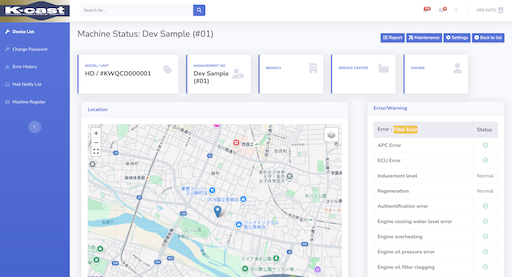
4. Reference data
This section explains how to reference various data, view reports
- Current Location
- Error and worning history
- Latest information
- Maintenance Information
- Monthly status list
- Position history
- Mode summary
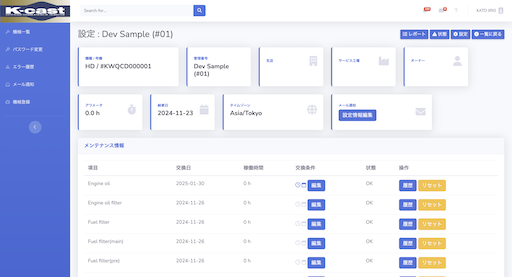
5. Maintenance and Inspection
This section explains how to reference maintenance and inspection histories, and edit conditions.
- Edit Exchange Conditions
- View Exchange History
- Manual Reset
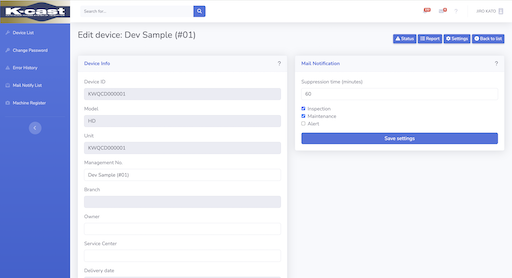
6. Device setting
This section explains how to set device info and mail notifications.
- Management number
- Owner name
- Service Center name
- Timezone
- Note(Tage)
- Mail Notification
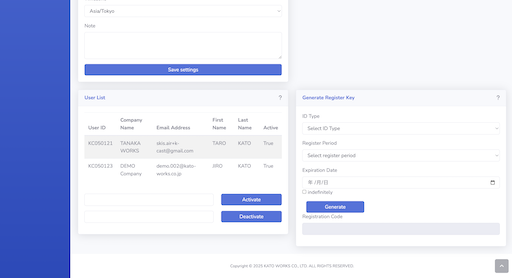
7. Activate, Deactivate Permissions
This section explains how to reference maintenance and inspection histories, and edit conditions.
- Granting permissions to other users
- Revoke owner permissions from users
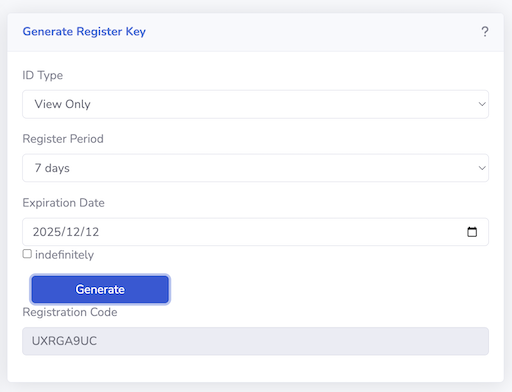
8. Generating registration key
Generate a key to disclose machine information by specifying the validity period and scope of permissions.
- Select role
- Select Register period
- Select Expiration date
- Generate Key